Trusted by 65,000+ candidates

Tech Screen

Your Invisible Interview Assistant

Don't Let a Tough Question Cost You Your Dream Job.

Try For Free Today

No credit card required
Version 2.0

Tech Screen In Action

Your Screen
Screen Share

Invisibility

Undetectable on any platform

Speed

Lightning-fast responses

Accuracy

Precise, reliable answers

Tech Screen stays
completely undetected

iconMicrosoft Teams
Undetected
iconZoom
If your zoom v6.16+, then you will need to set "Advanced capture with window filtering" in Zoom. Settings > Share screen > Screen capture mode
Undetected
iconChime
Undetected
iconMeet
Undetected
iconCoderPad
Undetected
iconCodility
Undetected
iconWebex
Undetected
iconHackerrank
Undetected

And ANY other interview software

Checked daily for compatibility

Everything you need
to CRASH an interview!

Invisible Screen Sharing

Stay completely hidden while sharing your screen. Works seamlessly with Zoom, Teams, Meet, and all major interview platforms without leaving a trace.
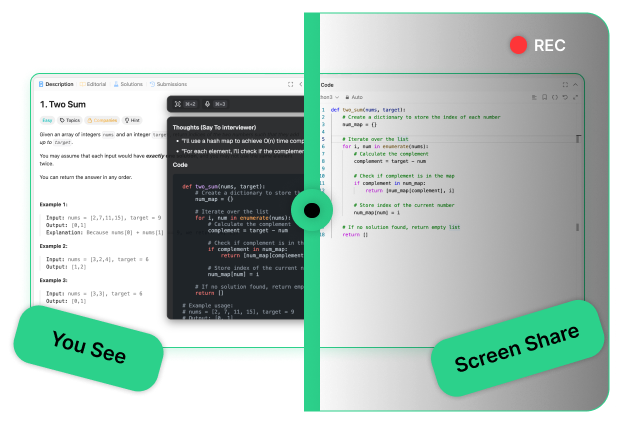
Invisible Screen Sharing

Always On Top

Keep the app floating above all other windows at all times. Whether you're in a browser, IDE, or video call — your answers are always one glance away.

Lightning-Fast Shortcuts

Control everything with keyboard shortcuts. Instantly show, hide, or move the window without touching your mouse — stay focused and undetected.

Conversation Mode

Listens to your system audio in real-time — Zoom, Meet, Teams, you name it. The moment a question is asked, you get an instant, accurate response ready to deliver.

Highly Customizable

Tailor the experience to your needs — add custom prompts, choose your programming language and verbal language, and select your interview type whether it's SWE, PM, or anything else.
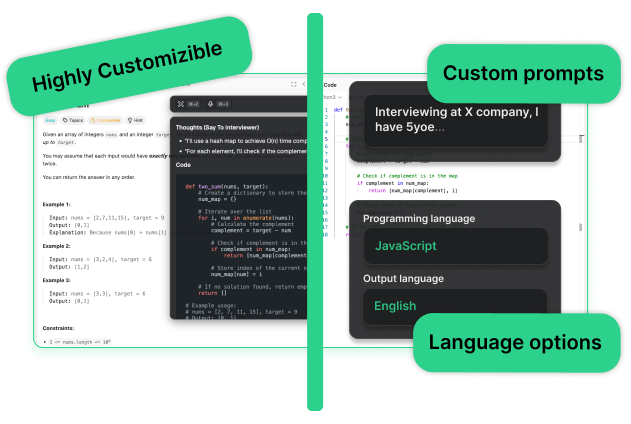
Highly Customizable

Delivered an average 80%
increase in interview success

Results
Others Can't Reach

See how Tech Screen stacks up against the competition

Features
competitor
competitor
competitor
competitor
Screen Share Invisibility
The app remains completely hidden during screen sharing. Only you can see it — interviewers see nothing.
Invisible in Tray and Dock
No visible app icon in your system tray or dock. Zero traces of the app running on your machine.
Affordable pricing
Simple, transparent subscription pricing. No hidden fees or $1000+ plans — just fair rates for everyone.
Free trial
Try before you buy with a genuine free trial. No credit card required, no strings attached.
Latest AI models
Powered by cutting-edge reasoning models, specifically fine-tuned for interviews and problem-solving.
Works with ANY type of interview
Flexible customization for any interview type — not just software engineering. Works across industries and languages.
Zero Detection Incidents
Our track record speaks for itself: not a single user has ever been detected using Tech Screen.
Perfect interface
Clean, intuitive design where everything is exactly where you expect it. No learning curve, just results.

Frequently Asked Questions

Everything you need to know about Tech Screen

Tech Screen is an AI-powered tool that helps you navigate technical interviews by providing real-time assistance. It works seamlessly in the background, ensuring you stay confident and perform at your best.
Tech Screen can process multiple types of input, including:
  • Computer audio (conversation mode)
  • Up to 7 screenshots
No. Tech Screen is completely invisible to screen-sharing software, screenshots, and recordings on platforms like Zoom, Google Meet, HackerRank, and CoderPad.
Tech Screen delivers instant and accurate responses, ensuring you get real-time assistance without delays, so you can focus on solving problems without interruptions.
We offer flexible pricing plans tailored to different needs. Check our pricing page for details on free trials and premium features.
Simply sign up, install Tech Screen, and start using it instantly—no complex setup required!
Get Started For Free

ACE Your Next Interview

Get fast and accurate AI responses when you need them the most

No credit card required
Setup in under 2 minutes
100% undetectable